Jigger: Cocktail Drink Recipes
- 4.3
- Rating
- 10.00K
- Installs
- Free
- Price

 Analysis by App-foxy
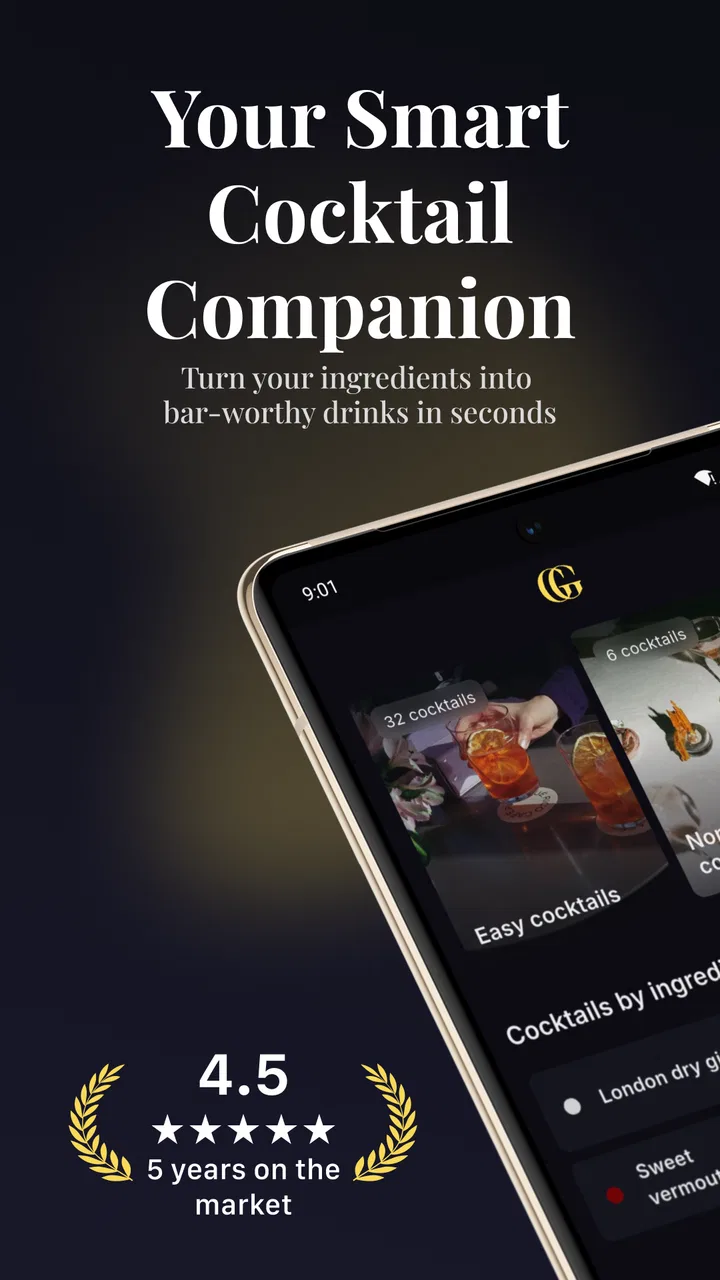
I spent time with Jigger: Cocktail Drink Recipes as a practical drink-planning tool rather than treating it like a simple recipe catalogue. It is aimed at people who already have a few bottles, mixers, and basic bar tools at home and want help deciding what to make. The most useful part of the idea is that it starts with your bar, not with an imaginary shopping list. That makes it much more relevant on an ordinary evening when I want to use what is already available.
The app belongs to the Food & Drink category and is developed by Oleh Zasadnyy. It is free to download, with optional in-app purchases ranging from $3.99 to $24.99 per item. The age rating is Everyone, so its presentation is approachable for a broad audience, although the recipes themselves are obviously intended for adults of legal drinking age. With a 4.3 average from around 139 ratings and over 10K installs, it has the feel of a focused utility with a modest but real user base rather than a huge social platform.
How Jigger fits into a real home bar
The first thing I noticed is that the app makes more sense when I think of it as a matching engine for ingredients. Instead of scrolling through endless cocktail pages and then discovering I am missing the one syrup or liqueur that makes a recipe work, I can approach the problem from the other direction: what can I prepare with the bottles and mixers in front of me? That small change saves time and reduces the temptation to buy ingredients for a single drink I may never make again.
You May Also Like

 AccuWeather: Weather Radar
AccuWeather Review: A Quick, Clear Forecast for Everyday Decisions
For everyday plans, the best forecast is the one you can understand quickly. AccuWeather makes rain timing, radar, and local conditions easy to act on, with a few trade-offs.

 Hill Climb Racing
Why Hill Climb Racing Still Turns Crashes Into One More Run
A tiny car, a bumpy hill and one more upgrade: Hill Climb Racing keeps resurfacing because its simple chaos makes every near-miss feel personal.

 AliExpress - Shopping App
AliExpress Makes Global Shopping Feel Personal, but Shoppers Bear the Risk
AliExpress turns a global marketplace into a pocket-sized discovery engine. Its reach is useful, its shopping loop compelling, and its trade-offs easy to miss.

 Lords Mobile: Kingdom Wars
Lords Mobile Is a Kingdom-Building Routine, Not a Quick Match
A case-by-case verdict on the building, battles, device demands, and social commitments that make Lords Mobile rewarding for some players and exhausting for others.

 PDF Scanner app - TapScanner
TapScanner Makes Paperwork Easier to Capture, Check, and Share
TapScanner makes scanning with a phone feel less like a rescue operation and more like a dependable step in getting work done. Its capture tools are useful, though not flawless.

 Block Blast!
 Shows How Much a Puzzle Game Can Leave Out
A quiet grid game shows why puzzle players increasingly value instant clarity, repeatable skill and low-pressure play—and where the genre still needs to catch up.
More From Our News Desk
View All News


This is especially handy after a grocery trip. I might have gin, rum, citrus, tonic, and one or two less familiar bottles, but no clear plan. A conventional web search usually brings back popular recipes first, not necessarily recipes that fit my cupboard. Jigger is more useful in that situation because its purpose is tied to the contents of the bar. I can explore possibilities, compare styles, and choose something that matches both my ingredients and the amount of effort I want to spend.
The app also works well as a learning aid for someone moving beyond basic mixed drinks. A beginner does not need to memorize the difference between every classic template before getting started. Looking through recipes can reveal how spirits, sweet ingredients, sour ingredients, bitters, and mixers are combined. I found that more helpful than reading a long article about mixology because the information is connected to something I can actually prepare.
That said, I would not describe it as a replacement for a complete bartender’s reference library. Its strongest role is helping me choose and assemble drinks. If I want deep historical background, detailed technique lessons, or a comprehensive explanation of why one dilution method works better than another, a dedicated book or specialist website may be better. Jigger is most convincing when I use it as a fast decision-making companion.
Using it before guests arrive
A realistic use case is a small gathering where several people want different drinks. Rather than promising a complicated menu, I can check which recipes overlap in their ingredients. This lets me choose a short selection that uses the same citrus, sweetener, and base spirits. The practical benefit is easy to overlook: a menu built around shared ingredients creates less waste and keeps preparation manageable.
I would prepare this list before anyone arrives. I can look for one refreshing long drink, one spirit-forward option, and one recipe that uses a bottle I rarely touch. Then I can place the necessary tools and ingredients together. The app helps with the discovery stage, but the final organization still depends on me. It does not remove the need to read each recipe carefully or verify that I have enough of every component.
For a larger party, I would be more cautious. A recipe designed for one serving may not translate perfectly when multiplied, particularly when citrus, ice, and dilution are involved. I would use the app to select drinks, then test one serving first. That extra step prevents a promising combination from becoming an expensive batch that nobody enjoys.
What the mobile experience is really like
Jigger is naturally suited to a phone because cocktail decisions often happen in the kitchen, beside a drinks trolley, or while shopping. I do not need a desk, a notebook, or a large screen to browse an idea and check what it requires. The compact format makes sense when my hands are already busy, although a phone screen can become less convenient once it is near splashes, sticky syrup, or melting ice.
I found the best workflow was to browse before starting, not while actively shaking or stirring. I can inspect a recipe, gather everything, and then keep the phone at a safe distance. This is a small but important habit. A recipe app is useful only when it reduces interruptions; repeatedly unlocking a wet phone or scrolling with messy fingers defeats that advantage.
The app’s current version is 2.11.0 and it supports devices running Android 7.0 or later. That broad compatibility is helpful for people using an older spare phone in the kitchen, though the quality of the experience will still depend on the device and its screen. Someone with a very old handset should expect a less comfortable browsing experience than on a newer, brighter display.
Its mobile format also makes spontaneous shopping more practical. If I am standing in a store and considering a bottle or mixer, I can use the app to think in terms of possible drinks rather than buying at random. The trade-off is that this kind of browsing may encourage overbuying if I treat every interesting recipe as a reason to purchase another ingredient. I recommend choosing a small theme first, such as citrus drinks or rum-based options, and then staying within it.
Connectivity, interruptions, and recovery
Connectivity shapes how confidently I use any recipe app, especially one intended for quick decisions. When the connection is behaving normally, browsing feels straightforward: I can explore ideas, inspect ingredients, and settle on a drink without reaching for a separate search engine. The experience is most convenient when I have already opened the app before beginning preparation.
I would not plan an important gathering around the assumption that every part of a connected app will remain available at every moment. A weak signal, a busy network, or a sudden interruption can turn a smooth browsing session into a pause at exactly the wrong time. My practical solution is simple: choose the recipes in advance, read them fully, and keep the selected ingredients together before I start mixing.
This matters more for a multi-step drink than for a basic highball. If I am only combining a spirit with a mixer, I can recover easily from an interruption. If the recipe involves several components, a garnish, or a particular order of preparation, losing my place is more frustrating. I prefer to treat the app as the planning stage and my own preparation as the execution stage.
When something goes wrong, I also avoid improvising blindly. If a recipe page becomes unavailable while I am working, I check what I remember, set aside the ingredients, and return to it before continuing. That may sound overly careful, but cocktail proportions can change the balance dramatically. A small mistake with a strong spirit or sweet ingredient is more noticeable than a small mistake in an ordinary cooking dish.
This is one area where a printed cocktail book or a saved personal note can be more dependable. A book takes up more space and cannot adapt to the bottles in my bar, but it does not depend on a live browsing moment. Jigger offers better discovery; a static reference can offer more predictable access. I see these as complementary rather than competing tools.
Keeping data use sensible
For people who watch their mobile data, the sensible approach is to do the exploratory work when connected to a trusted network. Cocktail browsing is not usually urgent, so there is little reason to spend mobile data repeatedly searching through recipes while shopping or preparing drinks. I would open the app ahead of time, decide what I want to make, and avoid unnecessary back-and-forth once the session begins.
This habit also improves battery use and concentration. A phone that is constantly being checked becomes another distraction in the kitchen. Planning a short menu in advance means I can put the device aside and focus on measuring, chilling, and serving. It also reduces the chance that a recipe change or an accidental tap sends me away from the instructions I was following.
Because the app has optional purchases, I would also take a moment to understand which parts of the experience I actually need before spending money. The free entry point makes it easy to try the basic workflow first. If I only make cocktails occasionally, the free version may be enough for discovering suitable drinks. A regular home bartender may find extra paid material worthwhile, but I would judge that by how often I use the app, not by the size of the catalogue alone.
One useful personal system is to keep a short list of reliable combinations outside the app after testing them. I can note which recipe worked with the particular citrus, ice, or glassware I had available. This does not diminish Jigger’s value; it turns it into a discovery tool that gradually helps me build my own dependable menu. The app suggests possibilities, while my notes capture what actually worked in my kitchen.
Small details that improve the workflow
My first tip is to treat the ingredient list as a shopping filter, not just a recipe requirement. Before buying anything, I look for several recipes that use the same base bottle or mixer. This creates a more flexible bar and avoids spending on a specialist ingredient with only one obvious use. It is a better strategy than choosing a drink because its photograph or name sounds appealing.
My second tip is to separate discovery from measurement. I browse several options first, select one, and only then collect the tools and ingredients. Jumping between recipes while pouring makes it easier to confuse quantities or substitute something that changes the balance. A short preparation pause makes the app feel much more useful.
My third tip is to use unfamiliar bottles as prompts for comparison rather than assuming the first recipe is the best one. If I have a liqueur or spirit I rarely use, I look for contrasting recipes: one lighter and refreshing, another richer or more spirit-forward. This gives me a better sense of the ingredient’s range and helps me decide whether it deserves permanent space in my bar.
There is also a social advantage. If friends have different preferences, I can use the available ingredients to offer meaningful choices without stocking an entirely separate bar. One person may want something tall and refreshing, while another prefers a shorter, stronger drink. The app does not replace taste judgment, but it makes the first round of options easier to organize.
Who should use it, and who should skip it
I would recommend Jigger to home drinkers who enjoy experimenting but dislike searching through recipes that require ingredients they do not own. It is also a good fit for beginners who want structure without committing to a formal mixology course. The ingredient-led approach gives a clear starting point, and the app’s Everyone rating makes its general presentation accessible.
It is less suitable for someone who wants a completely self-contained, offline-first reference that can be relied on without any connectivity concerns. In that case, a downloaded book or a deliberately offline recipe collection may be the safer choice. I would also point experienced bartenders toward a more technical reference if their priority is professional-level theory, exact service standards, or extensive background on classic cocktails.
People who rarely keep more than one spirit and one mixer at home may not get the full benefit either. The app becomes more valuable as the bar becomes more varied, because ingredient matching gives it more room to help. If I only ever make the same familiar drink, a saved note or a single recipe page is probably faster.
Finally, anyone trying to control spending should be careful not to confuse variety with value. The free download lowers the barrier to trying the app, but optional purchases can add to the cost. I would start with the free experience, make a few drinks, and only pay if the additional material genuinely changes how often or how effectively I use it.
My connectivity verdict
Jigger works best when I use it proactively: browse while connected, select recipes before preparation, gather ingredients, and then keep the phone out of the messy part of the process. That approach makes its mobile format feel convenient without asking it to carry the entire evening. It is a thoughtful match for a home bar because it begins with what I have rather than what a recipe author assumes I own.
The limitations are mainly about context. A live browsing experience can be less dependable during a weak connection, and the phone itself is not ideal beside wet hands and sticky tools. The app also cannot judge the quality of my ingredients, the balance of a substitution, or whether a complicated drink is sensible for a busy gathering. Those decisions remain mine.
Even with those caveats, I found it more useful than a generic cocktail search when I wanted to turn existing bottles into realistic options. The combination of recipe discovery and party planning gives it a clear purpose, while the free starting point makes experimentation low-risk. For me, Jigger: Cocktail Drink Recipes is worth trying if I want a practical way to explore my bar, provided I plan around connectivity and do not expect it to replace a detailed bartender’s manual.
Developed by Oleh Zasadnyy, the app was released in March 2020 and has continued to the current version noted above. Its focused design is its main strength: it helps answer the everyday question, “What can I make with this?” If that is the question I ask most often, it earns a place on my phone. If I need a permanent, fully independent reference or advanced professional instruction, I would choose a different tool and use this one only for inspiration.
FAQs for Jigger: Cocktail Drink Recipes
01What is Jigger: Cocktail Drink Recipes?
Jigger: Cocktail Drink Recipes is a cocktail-making app designed to help users discover, prepare, and organize mixed drink recipes. It provides instructions for classic and contemporary cocktails, usually including ingredient lists, measurements, preparation steps, and serving suggestions. The app is useful for beginners learning basic techniques as well as experienced home bartenders looking for new drink ideas.
02Does Jigger include recipes for beginners?
Yes, Jigger is suitable for beginners because its recipes generally present the required ingredients and preparation process in a clear, step-by-step format. New users can start with simpler cocktails before moving on to drinks that require shaking, stirring, muddling, or more specialized ingredients. However, beginners should still pay attention to measurements and drink responsibly, especially when experimenting with unfamiliar spirits.
03Can I use Jigger without having every ingredient or bar tool?
You can browse the recipes without owning a complete home bar, but some cocktails may require specific spirits, mixers, garnishes, glassware, or tools such as a shaker, strainer, muddler, or jigger. The app can help you identify what each drink needs, although it may not always provide a perfect substitute for every ingredient. Checking the recipe details before shopping will help avoid surprises.
04Is Jigger: Cocktail Drink Recipes free to download and use?
The app may be available to download at no initial cost, but availability of recipes and features can depend on the current version, platform, and any optional premium content. Users should review the Google Play Store or Apple App Store listing for the latest information about subscriptions, in-app purchases, advertisements, or limitations. Store terms can change, so confirm the price before accepting any payment.
05Does Jigger offer responsible drinking guidance?
Jigger is primarily a recipe and cocktail reference tool, so users should not assume that its instructions replace responsible-drinking advice. Alcohol affects people differently, and serving sizes or strength can vary depending on the ingredients and measurements used. Never drink and drive, avoid alcohol if you are under the legal drinking age or medically unable to consume it, and consider non-alcoholic alternatives when appropriate.
Pros
- Clear step-by-step recipes make cocktails easy for beginners to follow.
- Ingredient-based search helps use what is already available at home.
- Useful cocktail photos make it easier to choose a drink quickly.
- Covers classic and creative recipes for different tastes and occasions.
- Recipe details can help users discover unfamiliar spirits and mixers.
Cons
- Some recipes may require expensive or difficult-to-find ingredients.
- Alcohol-focused content may not suit users seeking non-alcoholic drinks.
- Measurements and serving sizes may vary between recipes.
- The large recipe selection can feel overwhelming for first-time users.
- Certain features or recipes may depend on an internet connection.

Jigger: Cocktail Drink Recipes
Gallery